Me Portal Overview
The Me portal is your personal hub for everything related to your events. It brings together your registrations, agenda, sessions, networking, tasks, documents, meetings, and more into one place.
Me
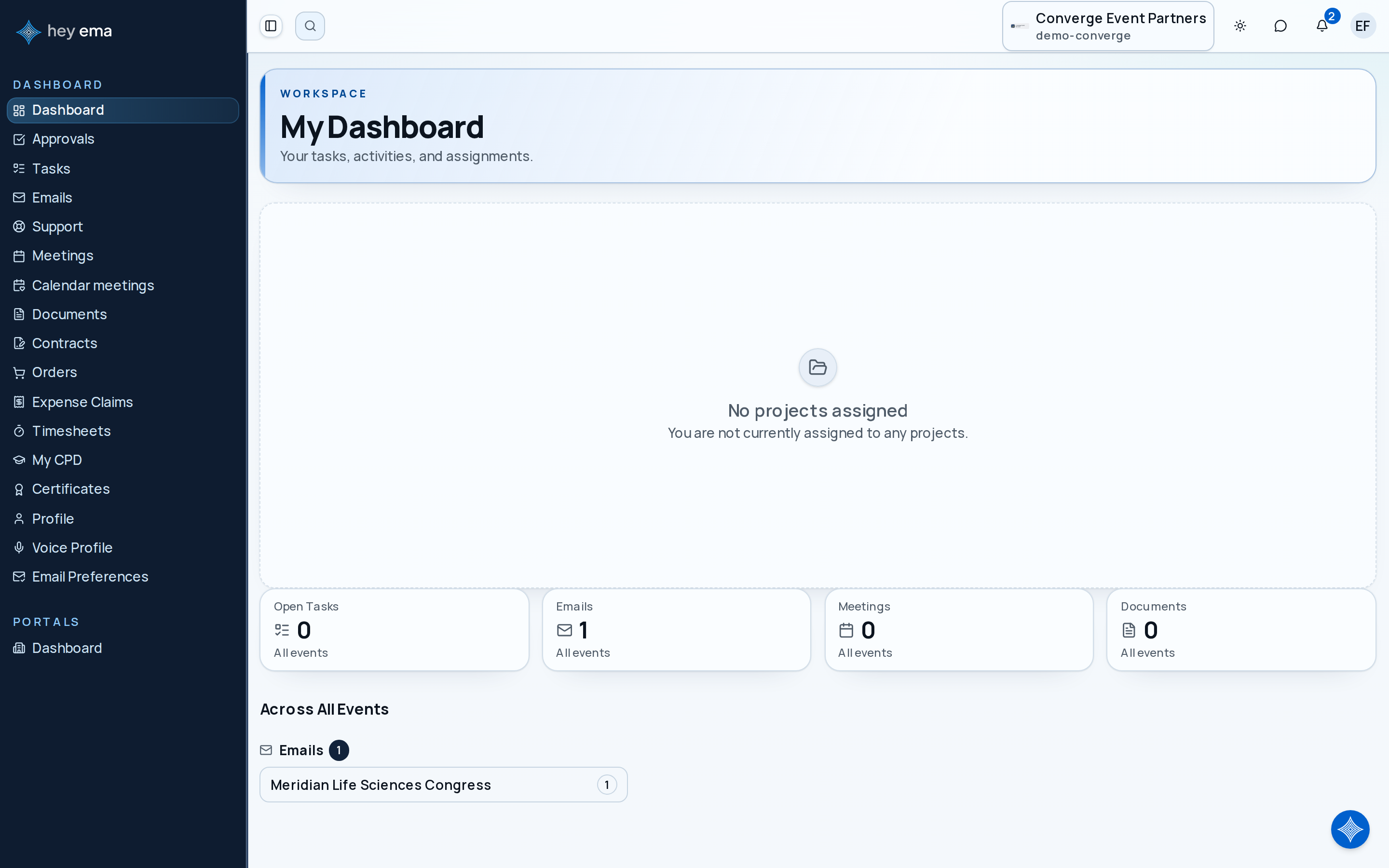
Sign in and navigate to Me. The dashboard described below loads across all events and organizations you belong to. Opening Me from within a specific event's URL takes you into that event's own portal view — your agenda for the event when the agenda feature is available to you — instead of the cross-event dashboard.
Attendee, speaker, reviewer, or exhibitor contact
See the newest tasks, meetings, talks, reviews, documents, and registrations that need attention.
Your active role
Move into attendee, speaker, reviewer, or exhibitor tools without switching accounts.
You
Update a profile, answer a task, upload a document, accept a term, or prepare for check-in.
Someone attending an event as a delegate, presenting a talk, and reviewing submissions can use the Me portal to see their pass, personal agenda, speaker checklist, pending review assignments, documents, and meetings from one place.
Dashboard
The dashboard gives you a snapshot of what needs your attention across every event you're part of. Summary tiles show a count for each area; click one to open the full list. Tiles for event features such as My Agenda, My Sessions, My Talks, Exhibitors and Reviews only appear when that feature is available to you (see When Features Appear):
| Tile | Description |
|---|---|
| My Agenda | Number of items on your personal schedule, across all events. |
| My Sessions | Number of sessions available to you, across all events. |
| Open Tasks | Open (not closed) tasks assigned to you. |
| My Talks | Talks where you are listed as an author or speaker. |
| Exhibitors | Exhibitor companies you are assigned to as a contact. |
| Emails | Emails across your events. |
| Meetings | Meetings across your events. |
| Documents | Documents from events you can access. |
| Reviews | Review assignments still awaiting your response. |
Below the tiles, an Across All Events section breaks down open tasks, talks, exhibitors, pending reviews, emails, meetings, and documents by project, so you can jump straight into the event that needs attention.
When Features Appear
Not every event offers every feature, so the menus and dashboard only show what applies to you. The My Event menu, the sidebars, and the dashboard tiles all follow the same rules, so a link never leads to a page that is not available.
| You see | When |
|---|---|
| My Agenda, My Sessions | The event has a programme. |
| My Event Pass, Registrations | The event uses registration. |
| Register | Registration is open for the event. |
| Feed, Connect (networking) | The event has attendee engagement turned on. |
| Book a Demo | The event also has an exhibition with exhibitor meetings you can book. |
| Activity, Leaderboard | The event has gamification turned on. |
| Exhibitors | The event has an exhibition. |
| Submit Talk | The programme is on, the call for submissions is open, and a submission form is available. |
| My Talks | The programme is on, and either you have a talk at the event or the call for submissions has started with a submission form available. |
| Reviews | The programme is on, and either you have a review assignment or the call for submissions has started with a submission form available. |
| Accommodation, Coordinator Portal, Hotel Portal | The event has accommodation turned on. |
Some links appear a moment after the page loads, once ema has checked what is available. With All Events selected, a link shows if it applies to any of your events. Your CPD log and certificates, tasks, documents, meetings, emails, orders, profile and support requests are tied to your account rather than to one event, so they are always there.
If you manage an event as an organizer but have no personal role in it (as an attendee, speaker, reviewer or exhibitor contact, for example), its links do not appear in the Me portal; use the admin area instead.
If a feature you expect is missing, the organizer may not have turned it on yet, or its dates may not have opened. Ask the organizer, or raise it through My Support Requests.
Portal Sections
Event Experience
- My Agenda -- your personal schedule built from sessions you've added
- Favourites -- everything you have starred: sessions, talks, posters, speakers and exhibitors
- My Pass -- your digital event pass with QR code for check-in and a summary of what your registration includes
- My Sessions -- browse sessions, participate in Q&A and polls
- Networking -- connect with attendees, book meetings, manage your networking profile
- Leaderboard -- track your points, badges, and ranking
- My Feed -- personalized activity feed with posts and updates
Registration & Logistics
- My Registrations -- view and manage your event registrations, passes, and add-ons
- Managed Registrations -- purchase and manage registrations on behalf of others
Contributor Portals
- Speaker Portal -- manage your talks, co-authors, checklists, and documents
- Exhibitor Portal -- manage your exhibitor profile, tasks, and approvals
- Reviewer Portal -- complete assigned reviews
- Requesting a Session -- propose a meeting or event session and follow its review and quote
Productivity
- My Tasks -- all tasks assigned to you across events
- My Documents -- documents shared with you or uploaded by you
- My Meetings -- meetings across all your events
- My Profile -- update your personal information and preferences
- My Support Requests -- open and track support requests with your event organizers
AI Assistant
The Me portal includes a chat sidebar powered by the ema AI assistant. Ask questions about your schedule, upcoming deadlines, session details, or any event data you have access to. When the assistant cannot answer, it can open a support ticket with the event organizer's team on your behalf — see AI Assistant and My Support Requests.
Use the Me portal for things assigned to you personally. If you are configuring an event, managing registrations, or changing programme settings, use the admin project area instead.
If you are also an exhibitor contact, your booth, content, tasks, contracts, and lead preparation live in a separate portal of their own.
Journey pages need an operator sign-in to open.
An attendee finds the event, registers, carries their pass and agenda to the venue, takes part, and leaves with their certificate and the recordings.
- Step 5 of 20See which event features are available to you, and why one is missingAttendee