Your Account Settings
Account settings let you update your personal details, change your password, review active sessions, control notifications and marketing email topics, and set approval delegations.
Account menu > Settings
Open the account menu (your name or avatar in the top navigation) and choose Settings.
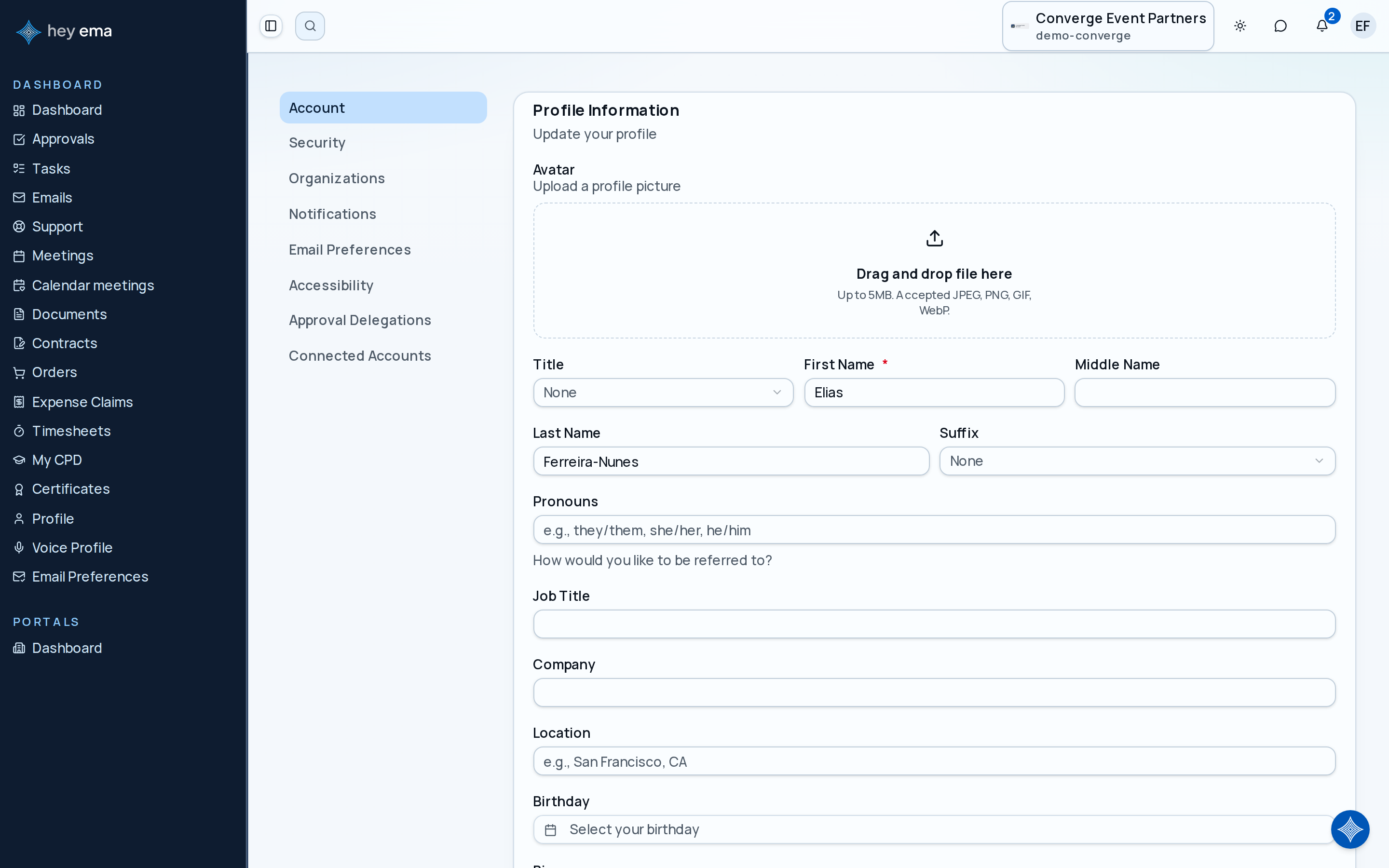
The account page has several sections in the sidebar:
| Section | What you can do |
|---|---|
| Account | Update your name, photo, and other profile details; set your membership number; connect or disconnect your ema account. |
| Security | Verify a requested login email change, change your password, and review active sessions. |
| Organizations | See which organizations your account belongs to. |
| Notifications | Choose which channel (email, push, SMS, in-app, Slack) delivers each type of update. |
| Email Preferences | Opt in or out of marketing and announcement emails, by topic. |
| Accessibility | Turn on high-contrast mode. |
| Approval Delegations | Hand off your approval authority to someone else for a set period. |
| Connected Accounts | Link your Slack account so ema can send you notifications there. |
Account
From the Account section:
- Update profile — change your name (including title, middle name, and suffix), pronouns, photo, location, birthday, phone number, bio, job title, and company. See My Profile for the full field list.
- Membership number — record a membership ID from a professional association or society (for example, for CPD tracking). Status, type, and expiry are shown for reference but are set by your organization, not editable here.
- Connect your ema account — link your organization account to your unified ema ("hey ema") account so cross-platform features stay in sync. This card only appears if your organization has ema's unified sign-in enabled. Disconnecting doesn't delete your ema account — you can reconnect at any time.
Security
From the Security section:
- Change password — enter your current password and set a new one. This only applies if your account has a password set; if you always sign in with an emailed code, your organization's SSO, or your phone, there may be nothing to change here.
- Active sessions — see every device and browser where your account is currently signed in, and sign out of any session individually.
If you see a session you don't recognize in the active sessions list, sign it out immediately and change your password if you have one set.
Verifying a Requested Login Email Change
If an organizer requests a login email correction for you, ema sends instructions to your current account address. Your login stays unchanged until you complete verification.
- Follow the instructions and sign in with your current login. A global ema account request opens your global account's Security page; an event account request opens Me > Account > Security for that event.
- Review the address in Requested login email change. Continue only if you requested the change and the address is correct.
- Choose Send a verification code.
- Check the new address's inbox, enter the Verification code, and choose Verify and change login.
- Look for Login email verified and changed. Use the new address for future sign-ins.
Only the newest pending request can be used. Requests expire after seven days. If the request expired or the address is wrong, ask the organizer to create a new request. If a code does not arrive, check the address and spam folder; an address already used by another account cannot be adopted by this flow. Contact support if you need help with an existing account.
An organizer can correct where booking correspondence goes without changing your login. A global ema login change applies across events, but it does not rewrite historical purchase or invoice details. Managed SSO logins must be changed through your organization's identity provider.
Organizations
Shows the organizations your account has access to, with a shortcut to switch into each one. If you expect to see an organization that's missing, contact an administrator.
Notifications
Choose how you're notified for each type of update, per channel. See Notification Preferences for the full list of channels and notification types.
Email Preferences
Manage which marketing and announcement emails you receive, grouped by organization-wide and per-event topics, with a single opt-out switch if you'd rather not receive any of them. This is separate from transactional emails (such as order confirmations or account notices), which can't be turned off here.
Accessibility
Turn on high-contrast mode (on, off, or match your system setting) for better readability.
Approval delegations
If you are an approver and will be unavailable, you can delegate your approval authority to another person:
- Go to Approval Delegations.
- Click Add delegation.
- Select the delegate and, optionally, the start and end dates the delegation applies to.
While a delegation is active, the delegate can act on approval requests assigned to you. A delegation with an end date expires automatically; you can also delete a delegation at any time to end it early.
Connected Accounts
Link your Slack account to receive notifications and approvals directly in Slack. Connect or disconnect at any time — disconnecting only stops Slack delivery and doesn't affect your other notification channels.
See My Approvals for how to review and decide on approval requests.