Exhibitor Entitlements
Entitlements are the benefits included in your exhibitor or sponsorship package. They might include staff passes, meeting slots, booth services, featured directory placement, sponsored content, or other items promised by the organiser.
Me > Exhibitors > [Your company] > Package > Entitlements
Open Package; the Entitlements section is first, showing the benefits included in your package and any add-ons you have purchased.
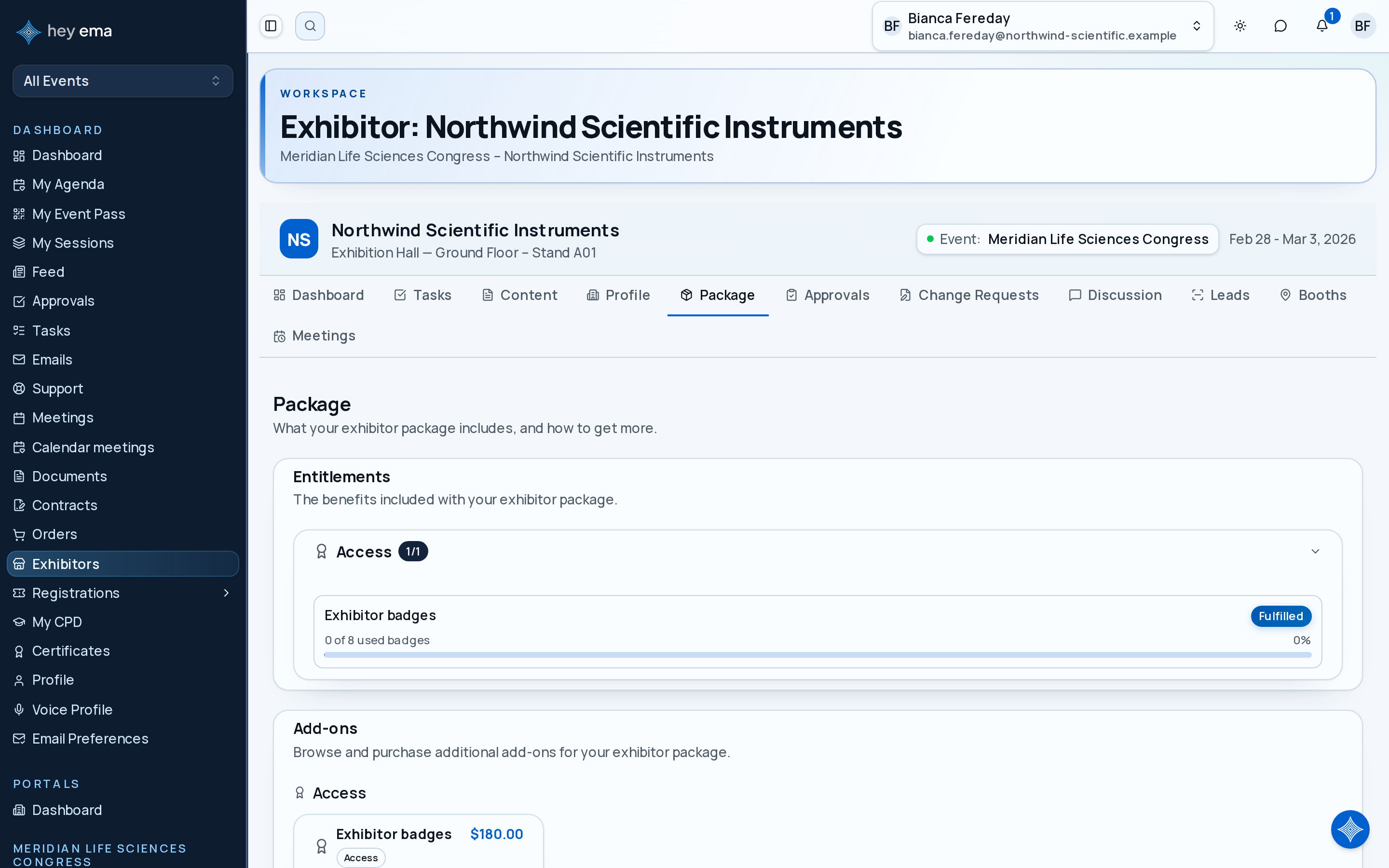
Reading Your Entitlements
Entitlements are grouped by category so you can quickly see what your package includes.
| Category | Examples |
|---|---|
| Access | Lounge access, VIP access, hosted functions |
| Branding | Featured listing, logo placement, banner placement |
| Meetings | Meeting slots or hosted buyer meetings |
| Registration | Staff passes or complimentary tickets |
| Digital | App placements, digital brochures, content slots |
| Physical | Booth services, furniture, power, signage |
| Services | Setup support or organiser-provided services |
Each entitlement card shows the benefit name, status, and usage if the benefit has a quantity.
If your package includes four staff passes and two meeting slots, the entitlement cards help you see how many have already been used before you invite more staff or accept extra meeting requests.
Understanding Usage
Some entitlements are counted. For example:
- "2 of 4 staff passes used"
- "6 of 10 meeting slots used"
- "1 of 1 sponsored email placements used"
If an entitlement is marked Unlimited, there is no cap for that benefit.
Check usage before making event plans. If your team expects six staff members onsite but your package includes four passes, buy additional passes or contact the organiser before the deadline.
Fulfilment Statuses
| Status | What it means |
|---|---|
| Pending | The benefit has not been delivered or reviewed yet. |
| In Progress | The organiser is working on it. |
| Fulfilled | The benefit has been delivered or confirmed. |
| Not Applicable | The benefit does not apply to your current package or circumstances. |
If a benefit looks wrong, contact the organiser and include the entitlement name so they can find it quickly.
Entitlements are not just a package summary. They are also how promised benefits are tracked through fulfilment, so review them before buying extras or asking for a package change.
Evidence
Some fulfilled entitlements include evidence, such as a file, link, or note. Evidence helps show what was delivered. For example, a sponsored banner entitlement might include a link to the live page where the banner appears.
Registration Entitlements
If your package includes registration passes, those passes are provisioned into a registration group for your company, and a Registrations tab appears in your portal. The tab is hidden until the organiser has provisioned passes for you.
Me > Exhibitors > [Your company] > Registrations
Open Registrations to see how many passes your package includes, how many are still unassigned, and who currently holds each one.
Each pass is a seat in the group and starts as an unnamed placeholder. On the exhibitor Registrations tab, use Assign to enter the attendee details or Assign to me to take the pass yourself. An unnamed seat without an intended invitee does not offer an initial invitation from this tab.
| Action | When to use it |
|---|---|
| Invite by email | Open the registration group you manage in Me > Registrations, then send the initial invitation from its group detail page so the person can complete their own details. |
| Assign | Enter the person's name and email yourself, without waiting for them to respond. |
| Assign to me | Take one of the passes for yourself. |
Once an invitation has been sent, Resend invite on the exhibitor roster sends it again to the saved invitee. Changing the booking contact does not change that invitee or establish claim ownership. Release frees a claimed seat so it can be given to someone else. Releasing a seat can optionally revoke that person's exhibitor-portal access at the same time.
The Registrations tab is not the same as your booth roster. The Team section on the Profile tab is your public directory of who attendees will meet at the booth; it grants no event access. Registrations are the event passes themselves. Someone can be on one, the other, or both.
A booth staff member with viewer access sees the roster but cannot claim, assign, or release seats.
What to Do If You Need More
If add-ons or upgrades are available for your event:
- Open Package and scroll to the Add-ons section to buy additional benefits.
- Scroll to the Tier upgrade section to compare higher tiers.
- Review the price and entitlement changes.
- Complete checkout if you decide to proceed.
If those options are not available, contact the organiser or submit a change request if your portal shows that option.
Add-ons and upgrades can change your entitlement list. After making a purchase or package change, return here to check the updated benefits and usage limits.
Related
Journey pages need an operator sign-in to open.
An exhibitor buys a stand and package online, signs and pays as the event requires, and every entitlement they paid for is delivered and evidenced.
- Step 11 of 13Exhibitor claims and assigns the registrations their package includesExhibitor
An exhibitor completes their own obligations unaided.
- Step 7 of 14Exhibitor claims what their package entitles them toExhibitor