Your Chair Briefs
Use your chair brief to prepare the introductions, timing and handovers for a session you chair or moderate. It includes private instructions from the organiser alongside the session’s running order.
Me > Chair briefs
You can also open Chair briefs from your event’s signed-in portal.
Sign in with the account assigned as a chair or moderator. You do not need an organisation staff membership. Being a presenter, panellist or attendee alone does not grant access to another session’s private brief. Ask the organiser to check your assignment if an expected brief is missing.
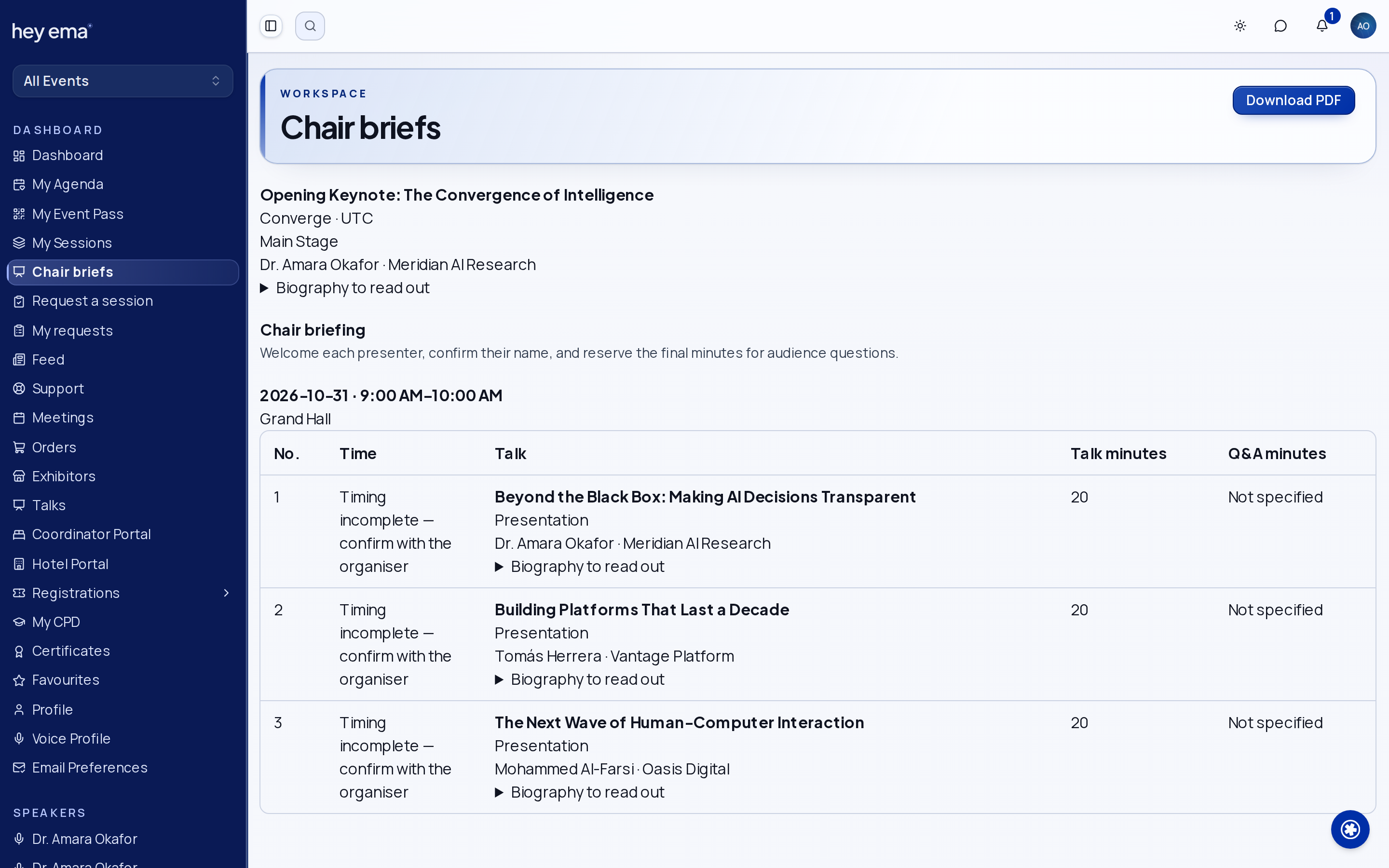
Your list shows the sessions you currently chair or moderate, their dates, rooms and event timezone. Past sessions holds earlier sessions that remain available to your account. Open a session for its current brief and Download PDF for a copy.
Prepare for Your Session
- Open the session and check its title, code, room and time. Review each occurrence if it is scheduled more than once.
- Read the Chair notes, presenter introductions and technical requirements.
- Check the Running order, including Talk minutes, Q&A minutes and each presenter’s delivery mode.
- Confirm any Unscheduled talks or Timing incomplete — confirm with the organiser warnings with the programme team.
- Use Join session when a meeting link is available and the organiser has asked you to join remotely.
Biographies and meeting links depend on the organiser’s brief settings. A missing joining action does not create an alternative meeting; contact the organiser for instructions.
The brief is a read-only preparation view. Ask the organiser to correct assignments, notes, times or talk order. Reopen the brief after a change and download a fresh PDF if you need an updated copy.
Use the Mobile App
Open Chair briefs from Home when you have an assigned session. The list puts today's sessions first and highlights your next session. Open a brief to read its running order, private notes and expandable biographies.
A brief you have already opened remains readable when the app is offline, with an offline notice and its last update time. Pull down to refresh when connected. Share PDF opens your device's share menu for a fresh copy; sharing and joining a remote meeting require a connection.
Switching your account or event changes which private briefs you can read. If the server reports that you no longer have access, the app removes its saved copy.
Check Your Work
- You have checked the correct occurrence, room and event timezone.
- You know the planned introductions, talk times and Q&A handovers.
- Any incomplete timings or technical questions have been confirmed with the organiser.
The programme team prepares the chair brief and controls its contents.
Journey pages need an operator sign-in to open.
- Build and publish the programmeDelivery
Every session sits in a prepared room at a time nobody is double-booked for, carries the code it will be printed with, and is visible to attendees exactly when you mean it to be.
- Step 20 of 24Read and download the brief for a session you chairSpeaker