Talk Dashboard
The talk dashboard is the landing page for a talk in your Me portal — it gives you an at-a-glance view of your progress and links to every other area of the talk.
Me > Talks > Open a talk > Dashboard
Open a talk from My Talks to land on its dashboard. If a talk has no dashboard tab open yet, ema redirects you here automatically.
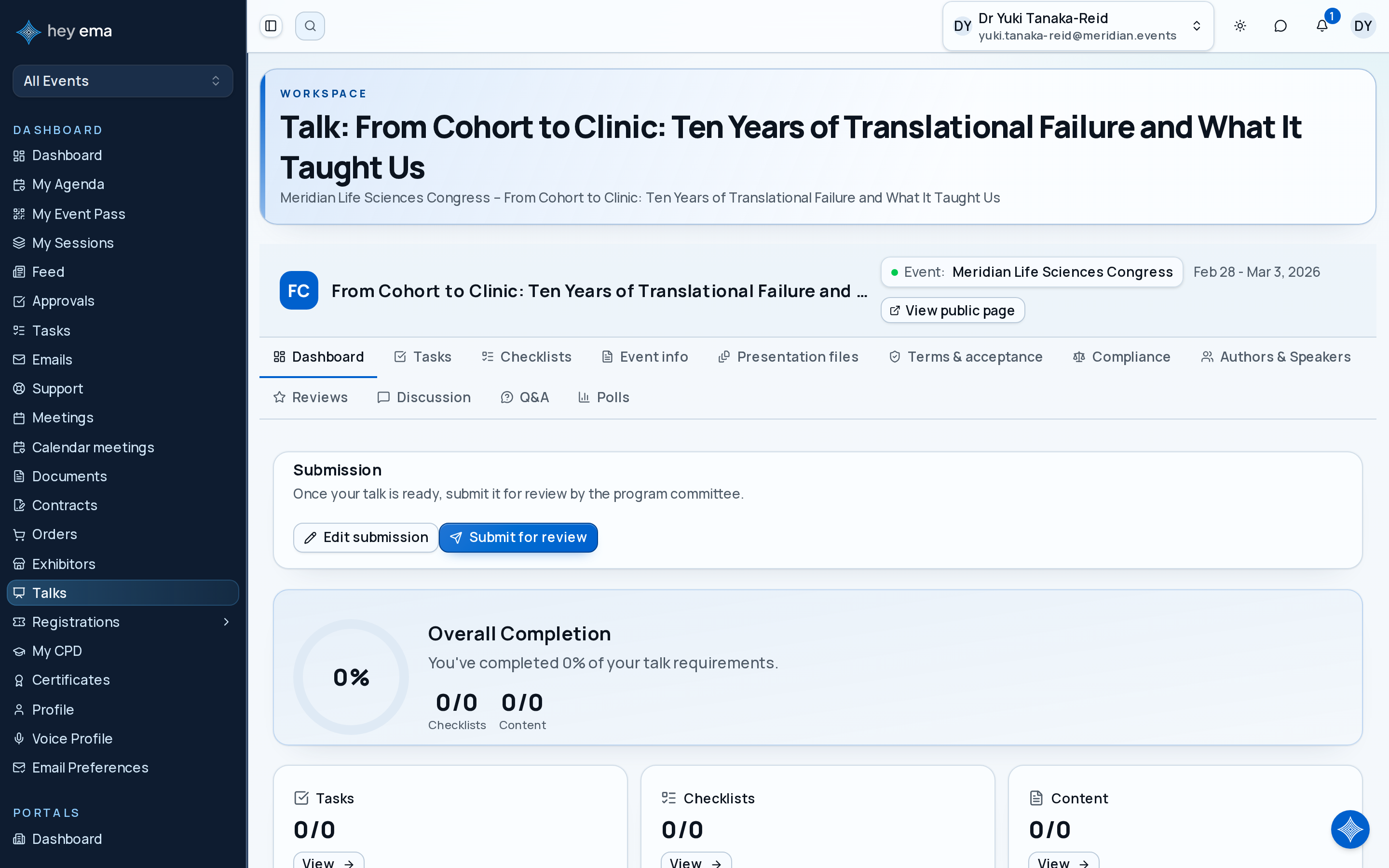
A speaker opens the dashboard two days before the submission deadline and sees that documents are complete, but one content acknowledgement is still missing. They open the Event info tab, acknowledge the briefing, and return to check their overall completion.
Talk Context
The dashboard header (shared across every tab) shows key details about the talk:
- Title
- Format (e.g., Keynote, Panel) with a color badge, if the project uses formats
- Status (e.g., Draft, Submitted, Accepted) with a color badge — status names and colors are configured per project
- If you are assigned to the same talk across multiple projects, a project switcher lets you jump between them
If the event team has assigned them, the header also shows the talk's Submission ID and Programme code, each with a copy button.
If your talk has been published to the public programme, a View public page link opens how attendees see it.
Additional Programme Details
The Details card shows extra information the organizer has made available for your talk. For example, you might update a programme contact or choose an existing supporting document. Your linked speaker profile also has a Details card on its Profile tab. Assigned session pages show their additional details as read-only information.

Some details are editable; others are read-only. If there are no exposed details, the card says No custom fields to show. A talk's edit-lock banner also applies to these details. Contact the organizer if a detail you need is missing, read-only, or locked.
- Open the talk dashboard or your linked speaker profile and find Details.
- Update the available answers. People, related records and files offer only choices you can use for that field. Search for a choice, or choose Load more choices when more results are available.
- For files, choose an existing authorized file or remove a selected reference. This picker does not upload a new file or replace your presentation. Use the talk's Presentation files tab for the separate upload workflow.
- Choose Save custom fields. Wait for the saved confirmation before leaving.
Date and time inputs use the event project's local time. A calendar date stays on the date you choose. Updating these details does not submit your talk for review or change its workflow status.
If a validation error or temporary save failure occurs, your current edits remain available to correct and retry. If access or the talk's editing status changes, refresh and review which details are still editable. If choices cannot load, use Try again in the affected field; if the intended choice is unavailable, ask the organizer to check access.
Check Your Work
- The saved confirmation appeared and the intended answers remain visible after reopening the page.
- File selections name existing documents you meant to reference; selecting one did not create another upload.
- Read-only session details were reviewed separately from your talk and speaker-profile edits.
Videos
If a recording, video-on-demand, or other video has been linked to your talk, it appears at the top of the dashboard so you can watch it directly. This section is hidden when no video is linked yet.
Overall Completion
A completion ring shows your combined progress across checklists and content acknowledgements as a single percentage.
Dashboard Stats
Below the completion ring, four stat cards summarize your progress and link through to the matching tab:
| Card | Shows | Links to |
|---|---|---|
| Tasks | Completed vs. total tasks assigned to this talk | Tasks tab |
| Checklists | Completed vs. total checklist items across all applied checklists | Checklists tab |
| Content | Acknowledged vs. total content articles requiring acknowledgement | Event info tab |
| Authors & Speakers | Total number of people credited, and how many are marked as presenting | Authors & Speakers tab |
Portal Navigation
Every talk has the same set of tabs, available from the portal navigation:
- Dashboard — this page
- Tasks — tasks linked to this talk
- Checklists — assigned checklist items
- Event info — knowledge base articles to review and acknowledge
- Presentation files — upload and manage talk documents
- Terms & acceptance — privacy, publishing, and data-use consent
- Compliance — recording consent and conflict-of-interest declarations
- Authors & Speakers — manage co-authors and presenters
- Reviews — reviewer feedback and progress (when visible)
- Discussion — a message thread with the event team about this talk
- Q&A and Polls — audience engagement tools for use during your session
The dashboard's completion percentage only tracks checklists and content acknowledgements. It does not reflect whether your documents, authors, terms, or compliance items are complete — check those tabs directly if you are unsure what the event team still needs from you.
Submitting and Withdrawing
You control the early status transitions of your talk yourself, from the Submission card on the dashboard:
- Submit for review — available while the talk is a Draft or has been Withdrawn. It is blocked until the checklists the organizer marked as required for submission are complete; if something is missing, ema tells you how many checklists still have incomplete items. Checklists the organizer marked as optional do not block it. The card shows the Submission deadline when one applies.
- Withdraw submission — available while the talk is Submitted or Under review. Withdrawing takes the talk out of review and moves it to Withdrawn. While the submission window is open you can edit and resubmit it; once the window has closed you cannot.
- Edit submission — opens a form for the talk's Title, Abstract and Full description. It appears while editing is allowed for the talk's current status and the submission window is open.
Submit and withdraw ask for confirmation before they go through. If editing is locked, a message explains whether the submission window has closed (with its date) or the talk can no longer be edited.
Decision on Your Talk
Once the program committee has accepted, rejected or waitlisted your talk, a decision card on the dashboard shows the outcome (Accepted, Rejected or Waitlisted). If the committee chose to share a reason with you, the reason is shown on the card; otherwise it simply says your talk has been accepted, rejected or waitlisted. Before a decision, the dashboard shows only the talk's status.
Checklist progress is one of the dashboard signals that determines whether your talk is ready for the next step. See Talk Checklists.
Manage who is credited on the talk, and who is marked as presenting, from the Authors & Speakers tab. See Talk Authors.
Journey pages need an operator sign-in to open.
Submissions are reviewed, accepted, scheduled, and published.
- Step 13 of 18Maintain exposed talk and linked speaker details, and read assigned session fieldsSpeaker
- Open the call for papersDelivery
Authors can find the call while it is open, submit a complete abstract with the right co-authors, and change or withdraw it only while the rules allow.