Your Account Settings
Account settings let you update your personal details, change your password, view active sessions, manage notification preferences, and set approval delegations.
Me > Account
Open the account menu from the top navigation or go to Me > Account.
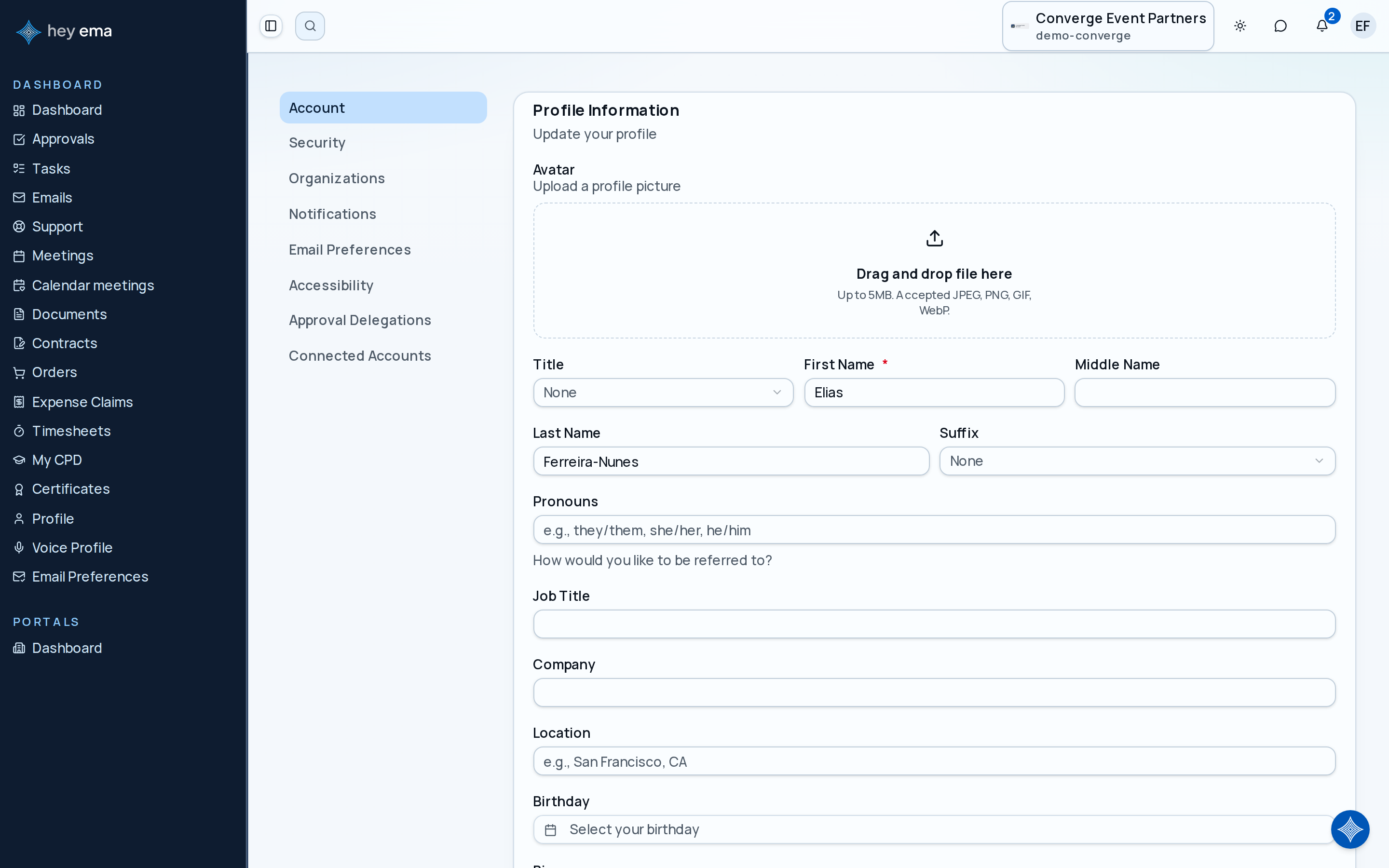
The account page has several sections accessible from the sidebar:
| Section | What you can do |
|---|---|
| Account | Update your name and profile details, your membership number, and connect or disconnect a shared "hey ema" platform account. |
| Security | Change your password and see active sessions. |
| Organizations | See which organizations your account belongs to. |
| Notifications | Control which in-app notifications you receive. |
| Email Preferences | Control which email notifications you receive — a separate section from Notifications. |
| Accessibility | Adjust accessibility preferences for the interface. |
| Approval Delegations | Set up approval delegations so someone can act on approvals in your absence. |
| Connected Accounts | Connect your Slack account to receive notifications and approvals directly in Slack. |
Account
From the Account section:
- Update profile — change your title, first name (required), middle name, last name, suffix, pronouns, job title, company, location, birthday, bio, profile photo, and phone number (with an SMS marketing-consent toggle). See My Profile for the full breakdown of profile fields, since they're shared across every ema portal.
- Membership — enter your membership number and see your membership status. This is separate from your job title and company, which live under Update profile.
- Connect your ema account — link or unlink your tenant account with a shared "hey ema" platform account, when your organization has that enabled. This lets you sign in the same way across every ema event you attend.
Security
From the Security section:
- Requested login email change — when an organizer has requested a correction, review the new address and verify it with an emailed code. Your login stays unchanged until verification succeeds. See Verify a requested login email change.
- Change password — enter your current password and set a new one.
- Active sessions — see all devices and browsers where your account is currently signed in. You can sign out of individual sessions from here.
If you see a session you do not recognise in the active sessions list, sign it out immediately and change your password.
Organizations
Shows the organizations your account has access to. If you expect to see an organization that is missing, contact an administrator.
Notifications and Email Preferences
Notifications controls which in-app notifications you receive. Email Preferences is a separate section that controls which email notifications you receive. Changes in either section take effect immediately.
Accessibility
Adjust interface preferences such as motion reduction or display settings.
Approval delegations
If you are an approver and will be unavailable, you can delegate your approval authority to another person for a set period:
- Go to Approval Delegations.
- Click to add a delegation.
- Select the delegate and the date range.
During the delegation period, the delegate can act on approval requests assigned to you. Delegations are scoped to the period you set and expire automatically.
Connected accounts
Connect your Slack account to receive ema notifications and approvals directly in Slack. Your workspace-wide connection is the default; you can also connect a specific organization separately — linking one does not link the other.
See My Approvals for how to review and decide on approval requests.